Buy Box Report
The Buy Box Report shows who is winning the Buy Box for your monitored products and how often each seller has held it during the selected period. You can also see the current Buy Box seller, Buy Box price, and your overall Buy Box win rate for each product.
Select a time period of 7, 15, 30, 45, or 60 days to analyze Buy Box performance. The Buy Box Wins column shows the sellers who held the Buy Box during the selected period and the percentage of Buy Box snapshots attributed to each seller.
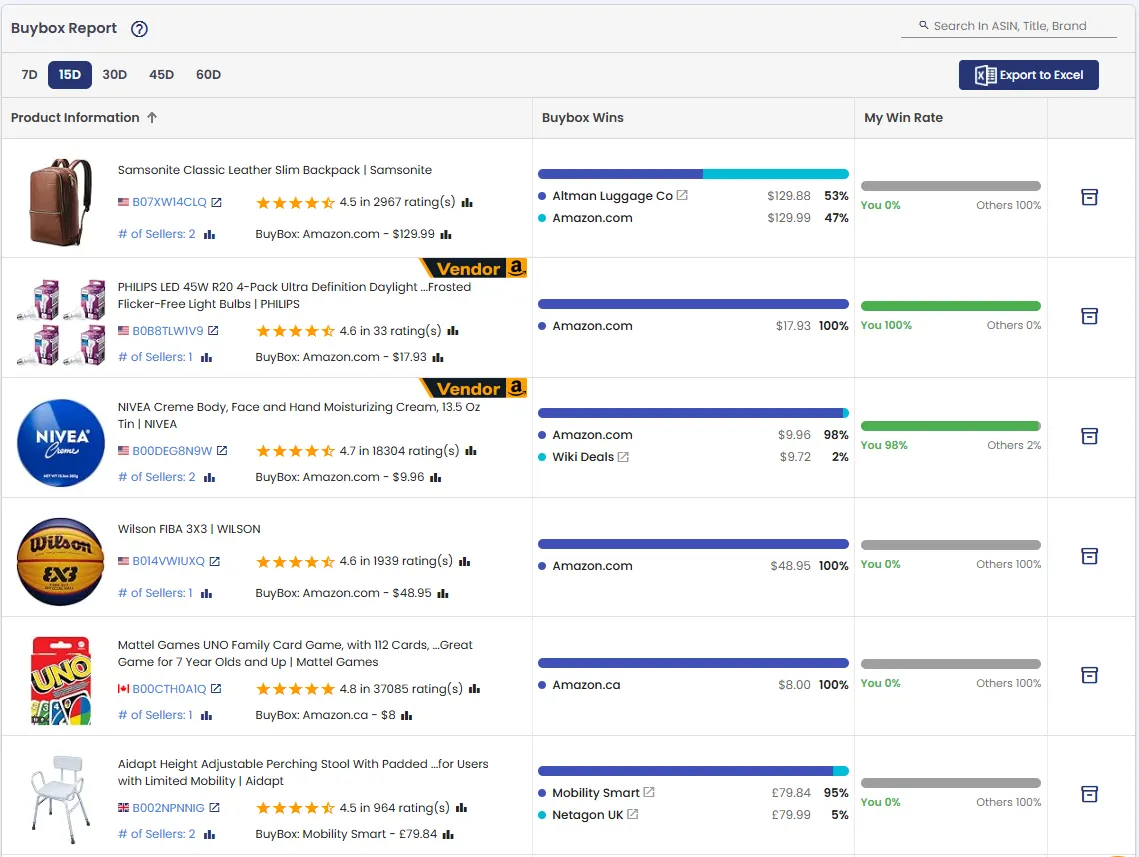
The My Win Rate column shows the percentage of Buy Box snapshots won by your registered merchants compared with other sellers. This makes it easy to identify products where you have a strong Buy Box position or where competitors are winning most of the time.
The report also shows the current Buy Box seller and price, allowing you to compare the current Buy Box position with the historical win distribution for the selected period.
💡 A Buy Box win counts as yours when the Buy Box is held by one of your registered merchants. For vendor-enabled products, a Buy Box held by Amazon also counts as yours. Make sure your merchant accounts are added under Merchant Info Settings so AmzMonitor can correctly identify your Buy Box wins.
Buy Box win rates are calculated using all recorded Buy Box snapshots within the selected date range. Buy Box data starts accumulating when a product is added to monitoring, so recently added products may have limited or no Buy Box history until enough snapshots have been recorded.
Like the other AmzMonitor reports, the Buy Box Report can be exported to Excel for further analysis.
BSR Report
The BSR Report helps you analyze the Best Seller Rank performance of your monitored products and understand how BSR changes over a selected period.
The report has two views: Product Based and Category Based. Each view provides a different way to analyze your BSR data.
Product Based
The Product Based view shows BSR performance for individual products. You can see the starting BSR, current BSR, and the change in rank for each BSR category.
You can analyze BSR performance across 3, 7, 15, 30, 45, 60, or 90 days. For products with multiple Best Seller Rank categories, each category is shown separately, making it easier to understand where a product's ranking has improved or declined.
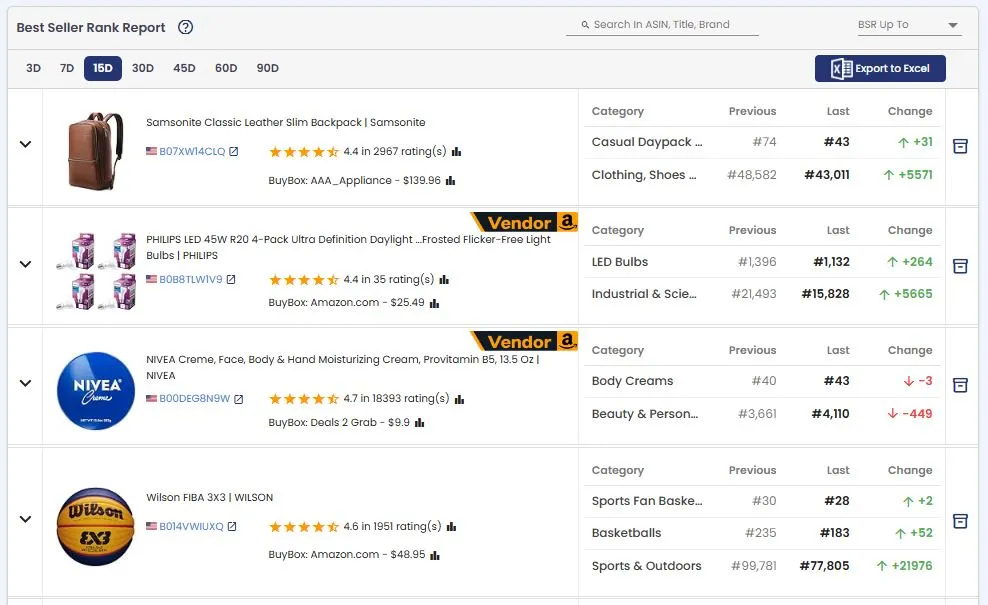
The report includes a BSR Up To filter that allows you to focus on products with a current BSR up to a selected rank. You can choose from predefined BSR ranges or enter a custom value.
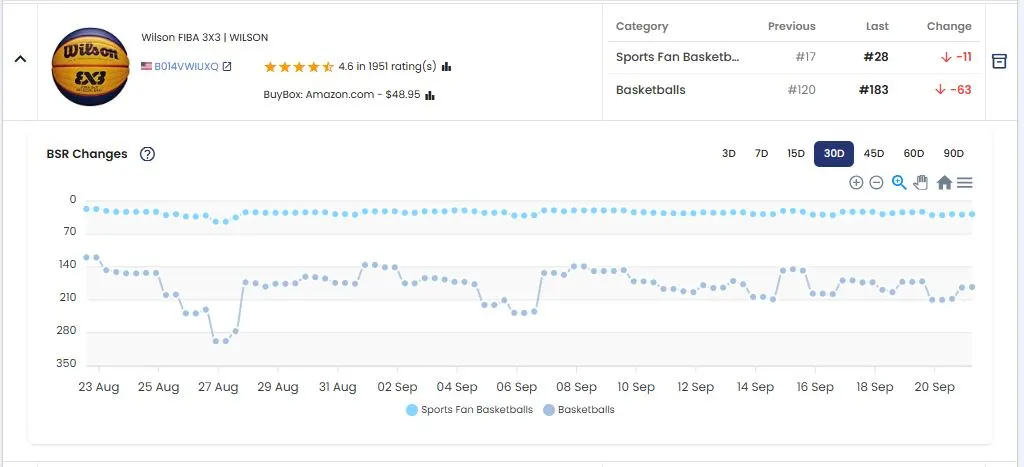
You can also expand a product to view its historical BSR trend and see how its ranking changed throughout the selected period.
The report also allows you to compare the BSR performance of two monitored products. Use the Compare with another product field to search by product name or ASIN. The search automatically filters your monitored products and displays matching results. After selecting a product, you can view both products together and compare their BSR performance over the selected period.
Category Based
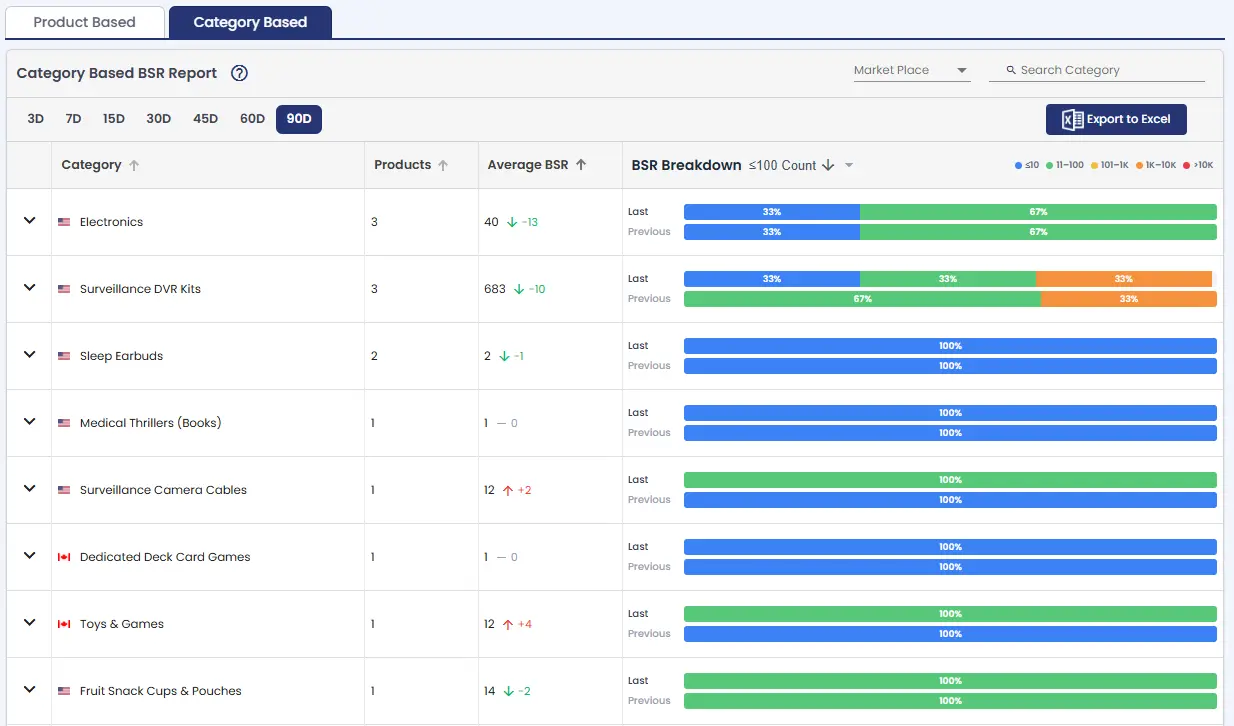
The Category Based view groups monitored products by BSR category, allowing you to compare the overall BSR distribution across categories.
Each category shows the total Product Count, Average BSR, and a BSR Breakdown showing how products are distributed across the following BSR ranges: ≤10, 11–100, 101–1K, 1K–10K, and >10K.
By default, categories are sorted by the number of products with a BSR of 100 or better, with categories having the highest number of highly ranked products shown first.
You can also sort the report by Category, Product Count, or Average BSR. The BSR Breakdown sort allows you to sort categories by the number of products within a selected BSR range.
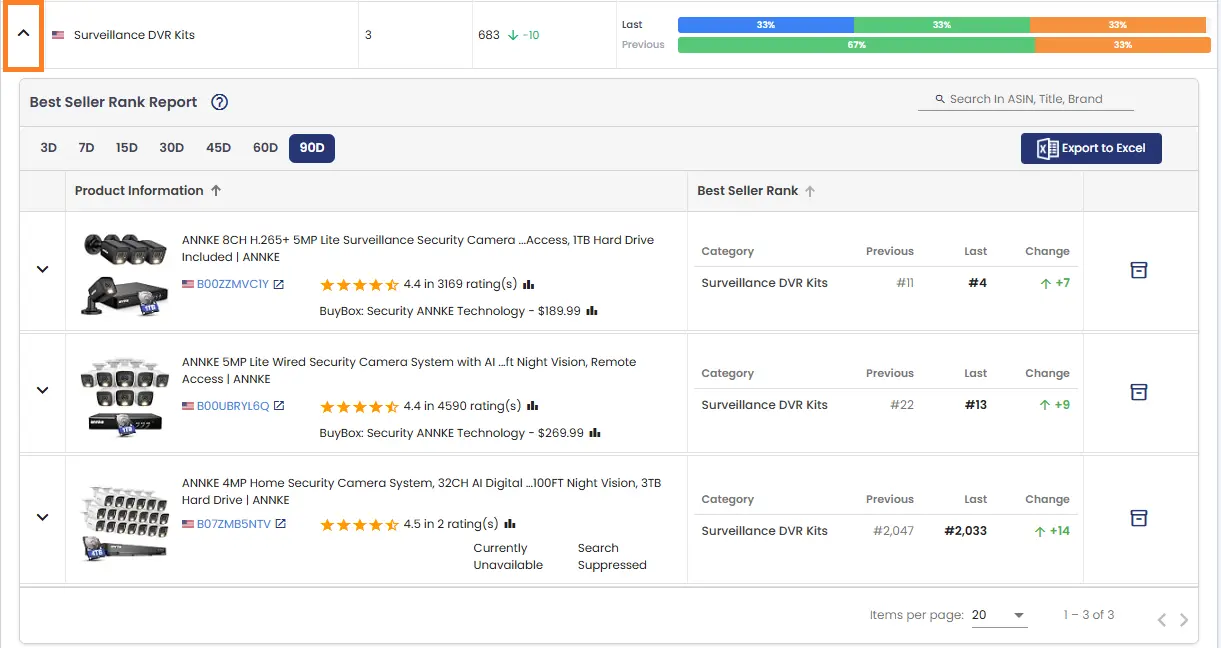
You can expand any category to view the products within that category . The expanded view shows each product's BSR performance for that category, allowing you to analyze and compare products based on their Best Seller Rank. Products are displayed in BSR order, making it easier to identify the best-performing products and quickly analyze ranking performance within each category.
Both BSR Report views can be exported to Excel for further analysis, reporting, or sharing.
Trend Report
Trend Report — The Trend Report gives you a snapshot of how your monitored products have changed over a selected time period. You can choose from preset intervals — 1, 2, 3, 7, 15, or 30 days — and view all your products in a single table, making it easy to spot trends at a glance. Each column shows the change in a key metric over the selected period, including Buy Box Price, Buy Box Ratio, Rating, Reviews, BSR, Sellers, and Listing — displayed as both percentage and absolute changes. The last column shows the total number of alerts AMzMonitor has generated for each product during the selected period.
Like all reports in AmzMonitor, the Trend Report can be exported as a CSV file. Additionally, BSR data can be exported separately as its own CSV for more detailed analysis.
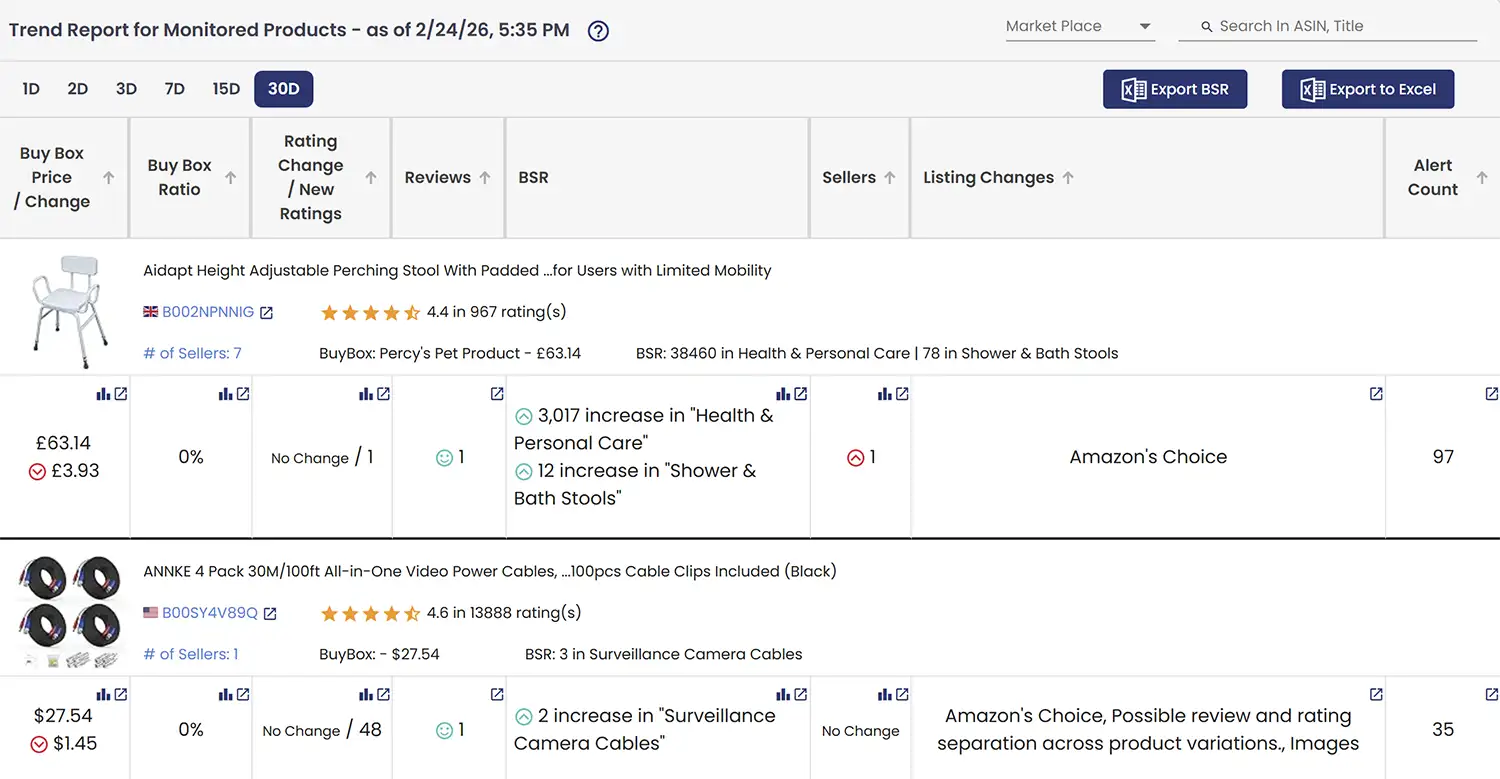
💡Cells in the table include quick action icons — click the  icon to view all alerts generated for that metric, or the
  icon to visualize the changes over the selected time period. Not all cells have both icons.
Reviews Report
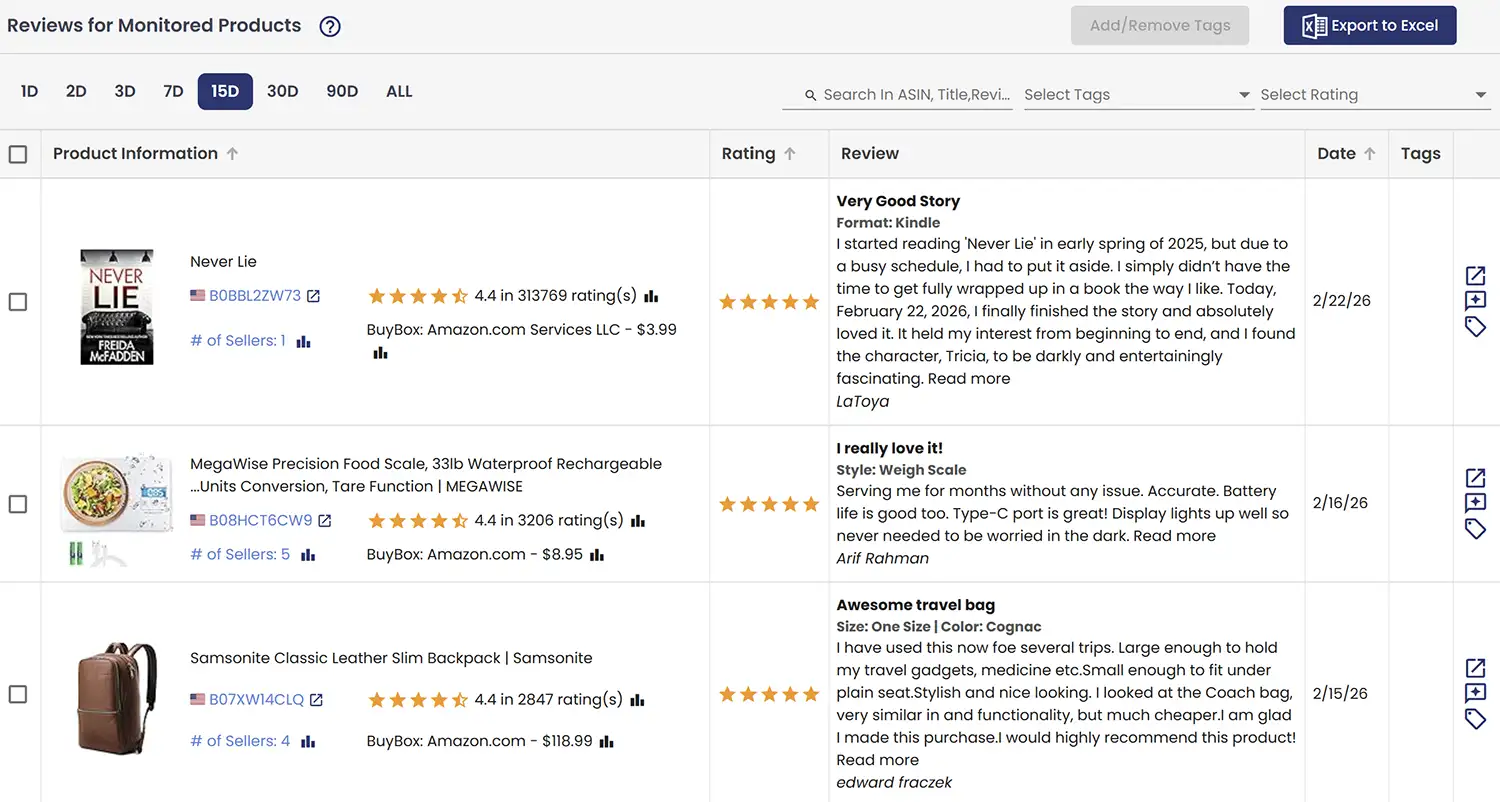
AmzMonitor captures the reviews visible on your product's Amazon page and lists them all in one place. Within the report, you can tag reviews that are important to you and filter by those tags later. You can also filter reviews by rating and date range, and export the data as a CSV file for further analysis.
⚠️Since Amazon now requires users to be logged in to access the full review history, and AmzMonitor does not store or use any Amazon login credentials, it can only display the reviews publicly available on the product page.
Customer Say Report
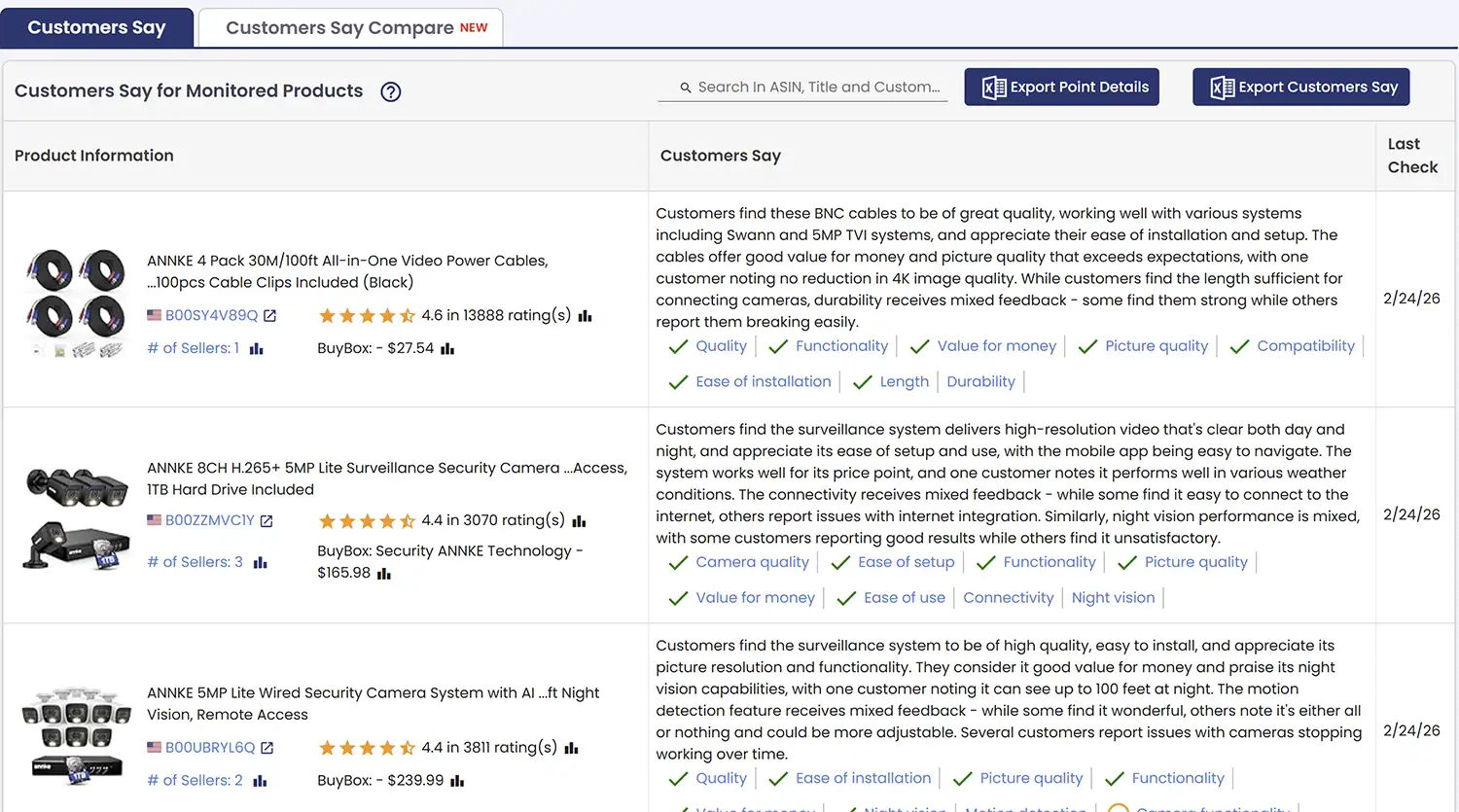
In addition to collecting reviews, AmzMonitor also tracks Amazon's AI-powered review summaries — known as "Customer Says" — for your monitored products. The first report gives you a centralized view of the latest AI-generated summary for each of your tracked products, so you can see how Amazon is currently summarizing customer feedback across your entire catalog in one place.
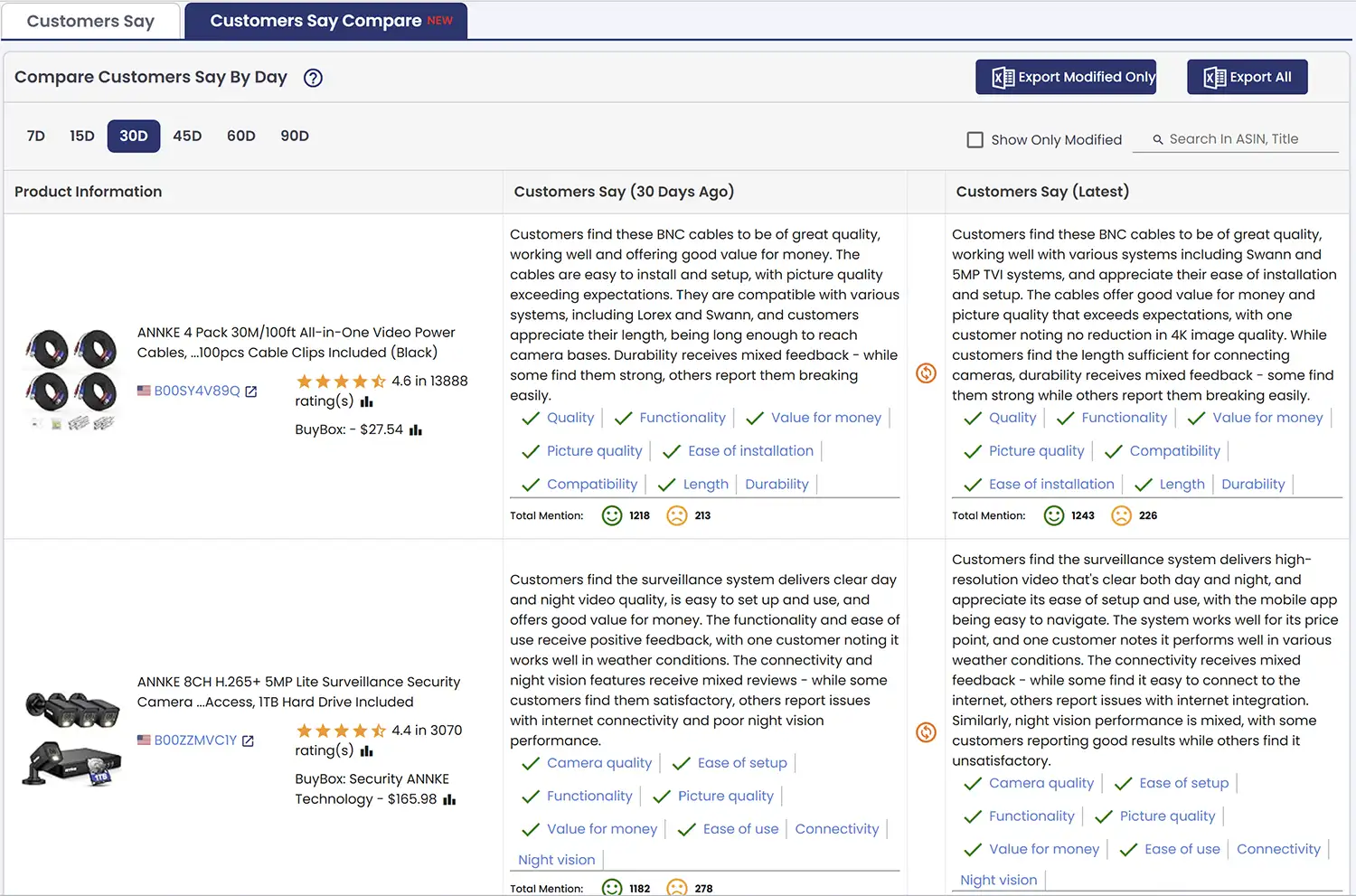
The second report shows how these summaries have changed over a selected time period. By comparing snapshots side by side, you can track shifts in positive and negative mention counts and see which product features are being highlighted or flagged over time — helping you spot changes in customer perception early.
Competing Sellers Report
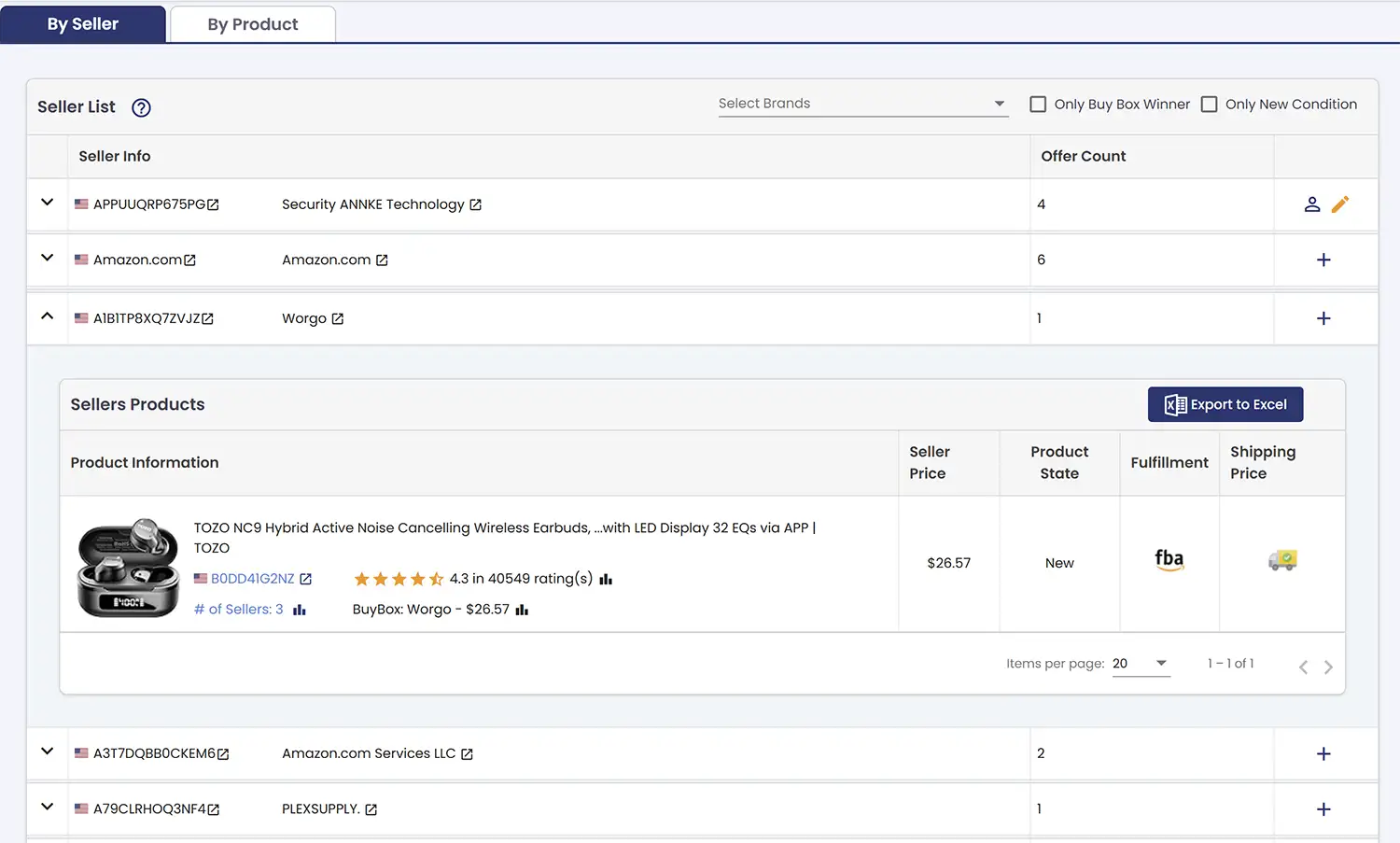
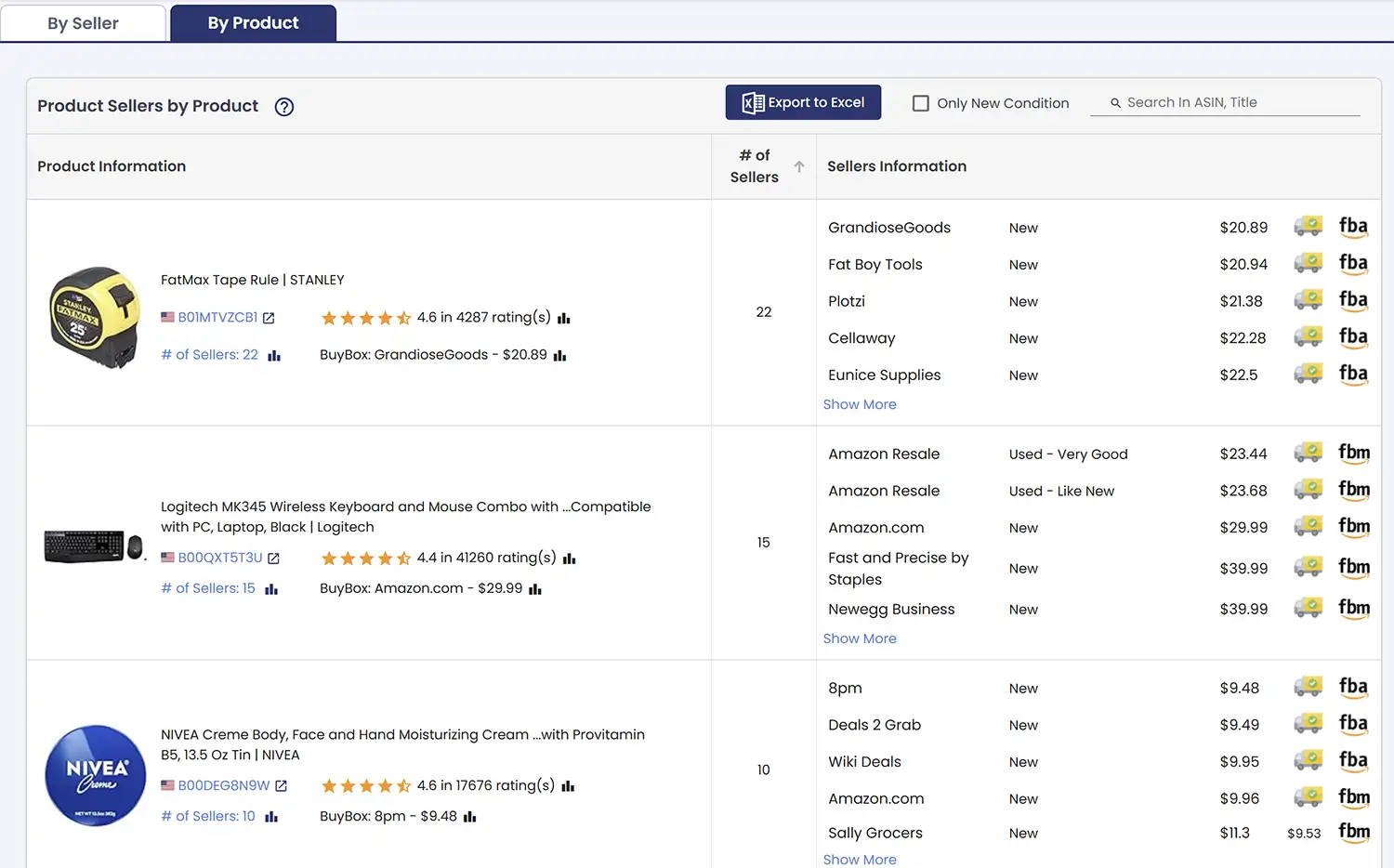
AmzMonitor tracks all the sellers on your monitored listings and records key details for each one — including their selling condition (New, Used, etc.), fulfillment method (FBA or FBM), shipping price where applicable, and most importantly, their listed price. Any changes to this data are sent to you as email alerts, and the full seller data is also available in two different report views.
The first view groups data by seller — each seller appears as an expandable row showing how many of your tracked products they are active on. Expand a row to see exactly which listings you share with that seller and their pricing details for each one.
The second view groups data by product — showing all active sellers on a listing in a single row. When a listing has many sellers, the top 5 are shown by default. Click the Show More link in the cell to expand and see the full seller list.
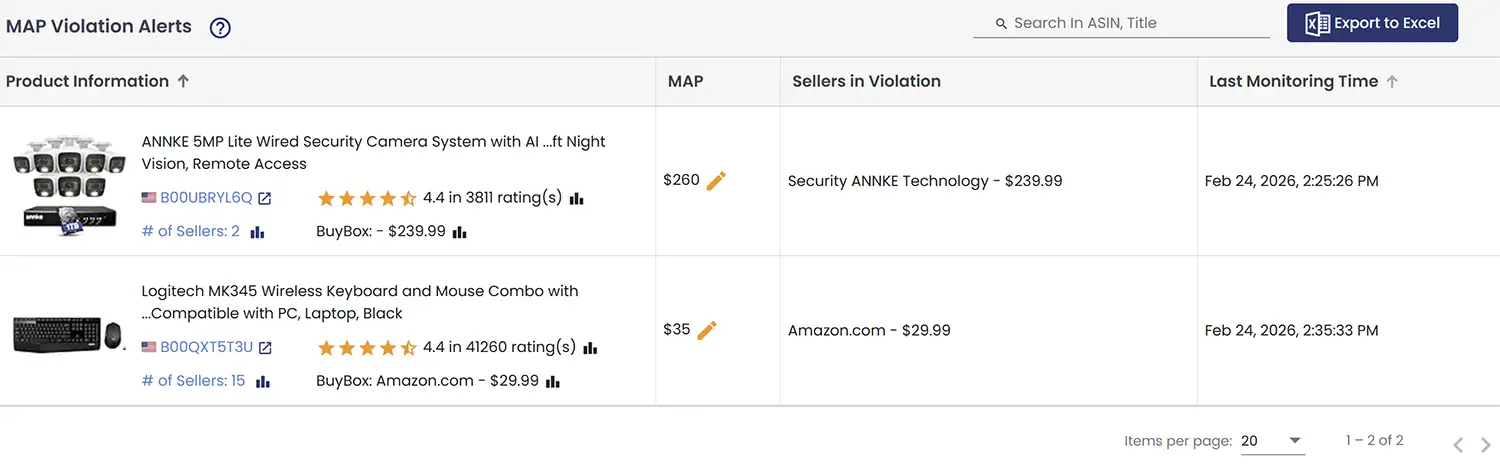
Map Report
When you set a MAP (Minimum Advertised Price) for a product, AmzMonitor sends you an alert whenever a seller drops below that threshold. The MAP Report brings all of these violations together in one table, showing the defined MAP price, the seller in violation, and their listed price. Having all violations in one place makes it much easier to spot patterns and repeat offenders — a single email alert can easily get lost in the noise, but seeing everything consolidated here gives you a clearer picture of what's consistently happening across your listings.