


One competitor appearing on one of your Amazon listings is business as usual. The marketplace is inherently open, and matching an existing ASIN is part of the standard retail model. However, the exact same competitor appearing across ten of your listings is a structural pattern you cannot afford to ignore.
When a single seller systematically shows up on multiple items in your catalog, it usually indicates that your store has been targeted. This behavior is rarely random. It typically means they have identified your specific niche, analyzed your profitability, and are deliberately cloning your product selection. If left unchecked, they will likely continue expanding into more of your listings, quietly eroding your market share from the inside out.
The core problem is that most Amazon software tools are designed to look at listings in isolation. Because sellers track their business on a product-by-product level, they treat every new competitor as an isolated event. This creates a severe operational blindspot that allows methodical competitors to replicate an entire storefront before the brand owner even notices a pattern.
The Hidden Pattern Behind Competitor Expansion
Competitors rarely appear across dozens of your listings overnight. More often, they expand gradually, adding one or two products at a time. They might begin with a single mid-tier ASIN to test pricing, inventory availability, or how your repricer responds. If nothing discourages them, they continue adding more listings over the following weeks until they have established a presence across a significant portion of your catalog.
The problem is that most Amazon monitoring tools make this gradual expansion difficult to spot. Marketplace data is typically organized by product first, showing the sellers active on each individual listing. While this works well for managing a single ASIN, it makes broader competitor behavior much harder to recognize.
As a result, a seller appearing across several of your listings often looks like a series of unrelated marketplace events rather than a competitor steadily expanding throughout your catalog. A new seller joins one listing today, another next week, and a third the week after. Because each notification is tied to a different product, it's easy to dismiss them as routine marketplace activity.
By the time you realize that the same seller is competing across a large portion of your catalog, they may already have established themselves in your niche, refined their pricing strategy, and built a meaningful presence on many of your most valuable listings.
How AmzMonitor Connects the Dots with the By Seller View
Identifying this kind of gradual competitor expansion requires more than monitoring individual listings. You need a way to view your catalog as a whole and quickly see which sellers are appearing across multiple products.
AmzMonitor continuously monitors the Amazon listings you choose to track in your dashboard. Whether you're tracking your own catalog to identify competing sellers or monitoring a competitor's products to analyze their seller activity, the system records every active seller along with prices, fulfillment methods (FBA or FBM), product conditions, and other offer details. This gives you a centralized view of seller activity across the listings that matter most to your business.
The By Product view helps you analyze the sellers competing on an individual ASIN. The By Seller view takes the opposite approach by grouping your monitored products around each seller. Rather than asking, "Who is selling on this listing?", it answers a much more valuable question: "Which sellers are competing across my catalog?"
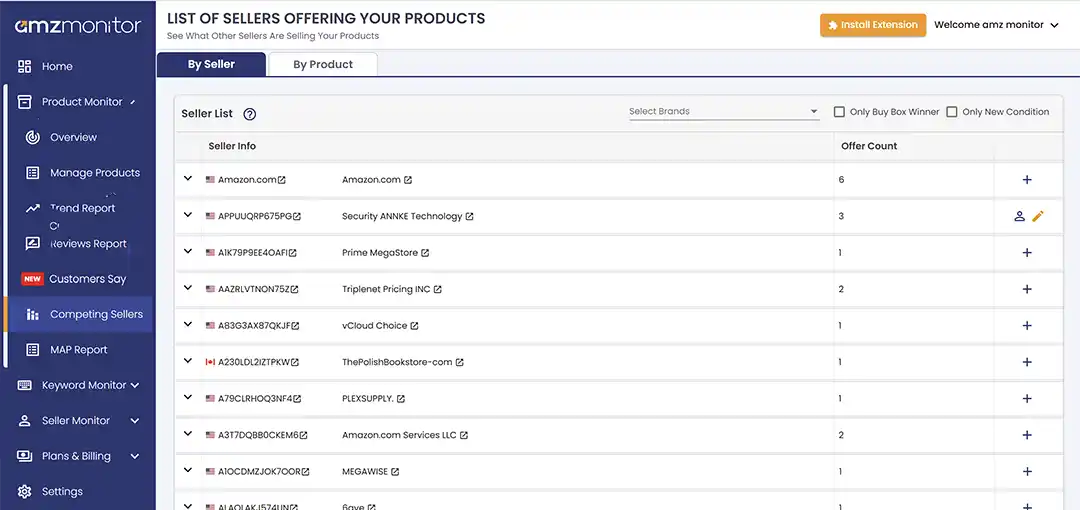
The report also includes filters such as Brand, Only Buy Box Winner, and Only New Condition, allowing you to focus on the sellers and offers that are most relevant to your analysis.
Expanding a seller opens a detailed table containing every monitored product you share with that merchant. For each product, you can see key marketplace information such as the current Buy Box winner and Buy Box price, while separate columns show that seller's own offer price, product condition, fulfillment method, and shipping details. This makes it easy to compare the seller's offer against the current marketplace status without opening each Amazon listing individually.
Seeing both the seller's offer price and the current Buy Box information side by side helps you quickly understand whether the competitor is actively winning sales or simply maintaining an offer on the listing.
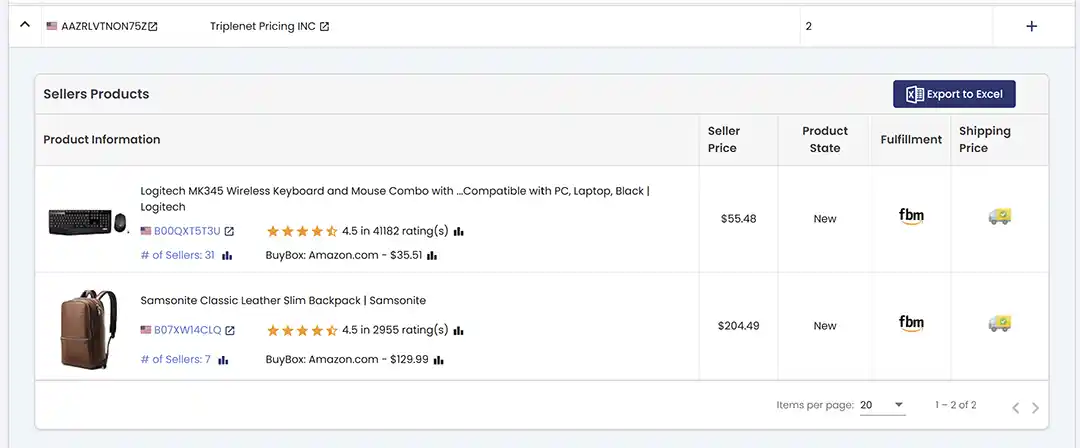
If you need to perform additional reporting or share the data with your team, the expanded product list can also be exported to Excel for further analysis.
What to Do When a Competitor Expands Across Your Catalog
When the same seller begins appearing across multiple products, it's worth looking beyond individual listings. A growing Offer Count may indicate that the seller is expanding into your niche rather than competing on just one ASIN.
The By Seller view helps you understand that expansion at a catalog level, allowing you to compare the products you share with that seller instead of reviewing each listing separately.
Start by comparing their fulfillment method. If they're selling through FBM while you're using FBA, you may not need to match every price reduction to remain competitive for the Buy Box. Looking at all shared products together makes these patterns much easier to spot.
If the same seller suddenly appears across several of your private label or exclusive wholesale products, it may also be worth reviewing your distribution channels to understand how inventory is reaching the marketplace.
Finally, having every shared product grouped under a single seller makes investigations much faster. Whether you're reviewing pricing, monitoring seller activity, or preparing documentation for Brand Registry or intellectual property reports, you can see the seller's entire footprint without jumping between multiple product pages.
Identify Competitor Expansion Faster
Reviewing individual product pages is time-consuming and makes it difficult to spot broader competitor trends. The By Seller view brings that information together in one place, helping you quickly identify the sellers with the largest presence across your monitored listings.
The Offer Count column shows how many of your monitored listings each seller appears on. Expanding a seller reveals every shared product, along with pricing, fulfillment method, and other offer details, making it easy to focus on the listings that deserve your attention first.
Instead of jumping between dozens of product pages, you get a complete view of each seller's footprint across your monitored catalog. This makes it much easier to recognize expansion patterns and respond before they become a larger competitive issue.
See It in Action
The By Seller view helps you move beyond individual product monitoring and understand how sellers are expanding across the listings you track. By organizing your data around sellers instead of products, you can quickly identify your biggest competitors, review their shared offers, and prioritize the listings that need your attention.
Want to see how it works? Explore our live demo to experience the By Seller and By Product reports with sample data.
For a complete walkthrough of every report and filter, including Offer Count, Buy Box Winner, Brand, and Condition filters, visit our Product Monitoring Reports guide.
You can also try the feature yourself with a 14-day free trial. No credit card is required, so you can explore all seller monitoring reports and see how they fit into your workflow before making any commitment.